We have a few new updates to report so let’s get to it!
Activities are now a part of sequences
The first is that the ability to add activities (tasks, calls, events, etc.) to sequences has been released! What this means is that you can now integrate activities at any time within your sequences. This might include setting a task or even scheduling a phone call, for example, two days after your second email message goes out. Read more about it here. Here’s some ideas!
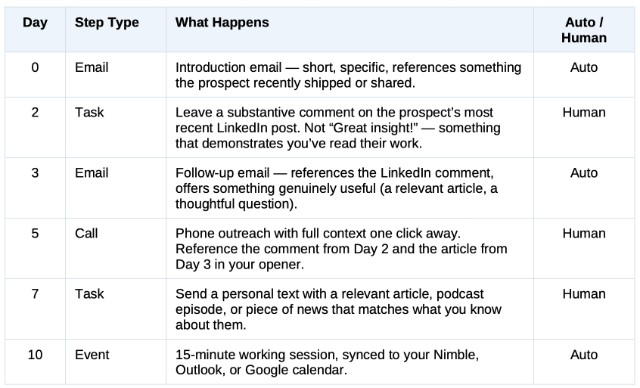
The main purpose of this feature is to introduce the human touch(s), such as text or phone, into the automated process that is sequenced email outreach. This gives you a personalized one-two punch!
More AI coming this year!
Some very soon. Some during this year …
AI Sequences – Sequences drafted from your actual relationship history. Personalized openers, not generic templates. I have access to a beta version of this, however, I do not know whether or not this has been widely released.
Relationship Graph – “Hey Nimble — I have 30 minutes. Who matters most today?” AI analysis across every signal in your network.
Email Signature Enrichment – Nimble reads email signatures to build and enrich contact records — for one email, or across your entire history.
Prospector gets a slightly new format
I have also spotted a minor update, not reported. The best example will be found on your Today Page. Perhaps you have noticed that, when you roll over a contact name that is showing in a widget, a snapshot of that contact pops up. Now, that popup is much larger and greatly expanded. If you are using Prospector, this is the new interface within Nimble.
You will also see this in your messages inbox and probably in other areas as well! On that topic, and I’m not sure if I mentioned this before, Prospector as it appears outside of Nimble such as on LinkedIn and Gmail, has also received a format update. With the exception of Gmail, It used to kind of overlay on top of the current window. Now it creates its own dedicated sidebar.
This sounds minor, but it really isn’t. If I was using Prospector on LinkedIn, and I wanted to copy and paste data from a profile, I constantly had to shift the box from left to right or right to left to reveal data that it was covering. Problem solved!
Now, I don’t use Outlook so you might test this. Outlook has its own dedicated Prospector add-on and it is not anywhere near as nice as the Chrome extension that is also used for Gmail. You may be able to use this extension in Outlook as well.
That will do it for today! Thank you again for placing your trust in my services!
If you would like to explore whether or not Nimble CRM, my sales training, or Sales Coach Pro might be right for you, please book a free 30-minute Zoom consultation with me by going to my calendar.
To learn more about our Nimble training and implementation services, please visit our Nimble CRM training services page.
I would also be happy to connect you to a marketing professional who I know and trust or to an automated yet personalized and human-to-human LinkedIn prospecting system. Please reach out to me at craig@adaptive-business.com for an introduction!

Craig M. Jamieson
Latest posts by Craig M. Jamieson (see all)
- AI & Nimble CRM – Practice & Preparation Tips - October 14, 2026
- Nimble CRM Tips & Updates – October 7, 2026 - October 7, 2026
- My Top 10 Sales Philosophies - September 30, 2026